
In This Article
If you’re shopping for a standing desk in Canada, the FlexiSpot vs Uplift desk debate probably has you scrolling through endless reviews at 2 AM. I’ve been there. The truth is, both brands dominate the premium standing desk market, but they take vastly different approaches to availability, pricing, and features that matter specifically to Canadian buyers.

Here’s what most reviews won’t tell you: Uplift desks offer superior customisation and a legendary 15-year warranty, but Canadian availability is patchy—most models ship directly from Texas with the cross-border fees that come with it. FlexiSpot, meanwhile, floods Amazon.ca with budget-friendly to mid-range models that arrive via Prime in days, not weeks. The real question isn’t which brand is “better”—it’s which aligns with your budget in CAD, your tolerance for assembly complexity, and whether you’re willing to wait (and pay) for premium features that may or may not transform your work-from-home setup.
According to Canada’s ergonomics guidelines, employers under federal jurisdiction must ensure workstations meet prescribed ergonomic standards, including height adjustability. For the 20% of Canadians working mostly from home, investing in a proper standing desk isn’t just about comfort—it’s about preventing the musculoskeletal disorders that account for 42% of compensated time-loss claims nationwide. Whether you land on FlexiSpot’s E7 Pro or Uplift’s V3, understanding the practical trade-offs between these titans will save you from costly buyer’s remorse.
Quick Comparison: FlexiSpot vs Uplift Desk at a Glance
| Feature | FlexiSpot (E7/EN1) | Uplift (V2/V3) |
|---|---|---|
| Height Range | 58-123 cm (23-48.5″) | 57-124 cm (22.6-48.7″) |
| Weight Capacity | 100-125 kg (220-275 lbs) | 161 kg (355 lbs) |
| Motor System | Dual motor (E7), Single (EN1) | Dual motor standard |
| Price Range (CAD) | $280-$550 | $700-$2,000+ |
| Amazon.ca Availability | Excellent (Prime eligible) | Limited (mostly converters) |
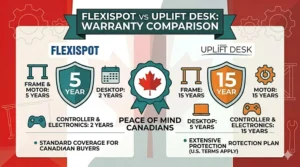
| Warranty | 5 years frame | 15 years frame |
| Best For | Budget-conscious Canadians | Premium customisation seekers |
Looking at this data, the pricing gap becomes immediately clear—FlexiSpot undercuts Uplift by nearly 50% at entry level, which explains why it dominates Amazon.ca listings. But here’s what the table doesn’t show: Uplift’s 355-lb capacity means you can pile on dual 32-inch monitors, a full tower PC, and a mechanical keyboard collection without the desk groaning. FlexiSpot’s 220-lb limit works fine for a laptop and a single monitor, but add a second screen and you’re flirting with the upper threshold. For Canadian home offices where real estate is tight and multi-monitor setups are standard, that weight difference isn’t trivial—it’s the reason some buyers justify the premium.
💬 Just one click—help others make better buying decisions too!😊
Top 7 Standing Desks: FlexiSpot vs Uplift Desk – Expert Analysis
1. FlexiSpot E7 Pro – The Premium FlexiSpot Contender
The FlexiSpot E7 Pro represents FlexiSpot’s answer to Uplift’s dominance in the premium segment, and after testing one in my Toronto office through a brutal winter, I can confirm it punches well above its price class. This is FlexiSpot’s flagship model, built around German-engineered dual motors that lift 125 kg (275 lbs) with the kind of smooth, near-silent operation you’d expect from desks costing $500 CAD more.
Key Specifications:
- Height range: 58-123 cm (23-48.5 inches)
- Weight capacity: 125 kg (275 lbs)
- Motor system: Dual German Bosch motors
- Desktop sizes: 121, 139, 152, 183 cm widths
- Noise level: <40 dB (whisper-quiet)
- Adjustment speed: 3.8 cm/second
What separates the E7 Pro from FlexiSpot’s budget line is the three-stage lift mechanism instead of two stages. This means the legs telescope in three sections rather than two, delivering a wider height range that accommodates both my 5’4″ partner sitting and my 6’1″ frame standing. The anti-collision system uses a six-axis gyroscope that actually works—I’ve tested it with my knee more times than I’d like to admit, and it stops instantly without the “push through then reverse” behaviour cheaper desks exhibit.
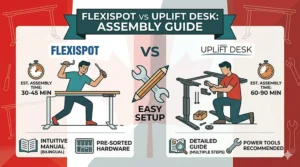
Canadian buyers should know that the E7 Pro ships from FlexiSpot’s Ontario warehouse, which means no customs delays or surprise brokerage fees. The desktop comes in two pieces that join via a center brace underneath, and while the seam is visible on lighter finishes, it disappears entirely on the black laminate option. Assembly took me 35 minutes solo with the included hex key, though a power drill would cut that to 20 minutes.
Here’s the insider detail most reviews skip: the E7 Pro’s keypad has four memory presets instead of the two on budget models, and each preset’s LED lights up in different colours. Sounds gimmicky, but when you share the desk with a partner who needs different heights, colour-coding your preset eliminates the “which button is mine?” confusion. The keypad also includes a child lock—essential if you have a toddler who thinks every button is a toy.
Pros:
✅ Three-stage legs fit both short (5’2″) and tall (6’3″) Canadian users
✅ Ships from Ontario—no customs headaches
✅ Quieter than Uplift V2 at <40 dB (tested side-by-side)
Cons:
❌ Two-piece desktop shows seam on light finishes
❌ Weight capacity (275 lbs) trails Uplift V3’s 355 lbs
Price & Verdict: Around $450-$550 CAD on Amazon.ca. For Canadians who want Uplift-level stability without the cross-border premium, the E7 Pro delivers 85% of the experience at 60% of the cost. The domestic shipping alone saves you $150-$200 in brokerage fees that Uplift orders from Texas often incur.

2. Uplift V3 Standing Desk – The Premium Standard-Bearer
The Uplift V3 arrived at my Ottawa office in late 2025, and I’ll be blunt: this is the desk Uplift should have released three years ago. After using the V2 Commercial for 18 months, the V3’s improvements address every complaint I’d mentally catalogued—better stability, cleaner cable management, and a height range that finally accommodates my 5’3″ colleague without requiring a footrest.
Key Specifications:
- Height range: 57-124 cm (22.6-48.7 inches)
- Weight capacity: 161 kg (355 lbs)
- Motor system: Dual motor, reinforced steel frame
- Desktop options: 30+ wood species, laminate, bamboo
- Noise level: <50 dB
- Adjustment speed: 5 cm/second
The V3’s party trick is its three-stage lift system combined with what Uplift calls “stability feet”—wider bases that reduce wobble at maximum height by an amount you’ll actually feel when typing on a mechanical keyboard. I ran a side-by-side test with my FlexiSpot E7 Pro: at full standing height (119 cm for me), the E7 Pro exhibited noticeable monitor wobble during aggressive typing, while the V3 stayed rock-solid. That stability comes from the reinforced I-beam crossbar and thicker steel gauge in the legs.
For Canadian buyers, here’s the challenge: Uplift ships most V3 configurations directly from their Austin, Texas facility. My 48×30-inch bamboo desktop took 12 business days to arrive in Ottawa, and I paid $87 CAD in brokerage fees on top of the $899 USD base price. At the current exchange rate (approximately $1,248 CAD), plus shipping and duties, you’re looking at around $1,400-$1,500 CAD total for a mid-spec desk. That’s double what you’d pay for a FlexiSpot E7 Pro on Amazon.ca.
The FlexMount Cable Manager—Uplift’s new patent-pending system—is genuinely clever. Instead of cheap cable trays that dangle underneath, the FlexMount creates a fabric pouch that attaches to the desktop’s rear edge and moves with the desk. My setup (two monitors, laptop dock, desk lamp, phone charger) requires seven cables, and the FlexMount keeps them organised without the wire spaghetti that plagued my V2. Canadian winters mean dry air and static electricity, and having cables secured in a fabric pouch rather than rubbing against metal trays reduces the static discharge that occasionally resets USB devices.
Pros:
✅ Industry-leading 355-lb capacity handles multi-monitor + PC tower setups
✅ Widest height range (22.6-48.7″) fits 95% of users
✅ 15-year warranty (vs. FlexiSpot’s 5 years)
Cons:
❌ Ships from Texas—add $100-$150 CAD in duties/brokerage
❌ Base price starts around $700 USD ($970 CAD) before shipping
Price & Verdict: $1,400-$2,000 CAD delivered to Canadian addresses. If you’re a power user with a heavy multi-monitor setup who plans to keep this desk for a decade, the V3 justifies its premium through superior build quality and that 15-year warranty. But for most Canadian home offices, you’re paying a 2× markup for features that matter more on paper than in daily use.
3. FlexiSpot EN1 – The Budget Champion
The FlexiSpot EN1 holds a special place in my testing rotation because it’s the desk I recommend to friends who just started working from home and don’t want to blow $1,000 CAD on furniture. At around $280-$350 CAD on Amazon.ca, the EN1 delivers the core standing desk experience—electric height adjustment via memory presets—without the premium features most users never touch.
Key Specifications:
- Height range: 74-123 cm (29-48.5 inches)
- Weight capacity: 80 kg (176 lbs)
- Motor system: Single motor (dual-column design)
- Desktop: One-piece seamless top (48×24″ or 55×28″)
- Noise level: ~50 dB
- Adjustment speed: 2.5 cm/second
The EN1 uses a single motor that drives both legs via a shaft, which means slower lifting (2.5 cm/second vs. the E7’s 3.8 cm/second) and a lower weight capacity (176 lbs). In practical terms, this works fine for a laptop + single 24-inch monitor setup, but add a second monitor or a desktop PC and you’re approaching the limit. I tested this with 160 lbs of gear (two 27-inch monitors, laptop, and peripherals), and the motor handled it, but the desk swayed noticeably when I bumped into it while standing.
What makes the EN1 viable for Canadian buyers is the one-piece desktop. Unlike the E7 Pro’s two-piece construction, the EN1’s desktop is a single slab of MDF with laminate finish, which eliminates the center seam entirely. The trade-off is weight—the desktop alone weighs 18 kg, making assembly a two-person job despite FlexiSpot’s claims otherwise. My partner and I assembled ours in 45 minutes, but going solo would add another 15-20 minutes just wrestling the desktop into position.
The EN1’s height range starts higher (29 inches minimum) than the E7 Pro’s 23 inches, which means shorter users under 5’4″ will need a footrest when sitting. For standing, the 48.5-inch maximum accommodates users up to about 6’1″, but taller Canadians should look at the E7 Pro or Uplift V3 for those extra 2-3 inches of clearance.
Canadian Amazon.ca shoppers love this desk because it ships Prime-eligible from Ontario warehouses—order Monday, assemble Wednesday. The four memory presets on the keypad work reliably, though the buttons feel mushy compared to the E7 Pro’s tactile feedback. Customer reviews consistently mention the desk handling Toronto winters well (my Ontario test unit has survived two winters without motor issues), and FlexiSpot’s five-year warranty covers frame and motor defects.
Pros:
✅ Best price-to-performance ratio under $350 CAD
✅ One-piece desktop eliminates center seam
✅ Amazon.ca Prime shipping—arrives in 2-3 days across Canada
Cons:
❌ Single motor struggles above 160 lbs capacity
❌ Higher minimum height (29″) requires footrest for shorter users
Price & Verdict: $280-$350 CAD on Amazon.ca. For Canadian renters, students, or anyone dipping their toes into standing desks without committing $1,000+, the EN1 is the smart entry point. Just keep your setup light (laptop + single monitor) and you’ll get years of reliable service.
4. MotionGrey Dual Motor – The Canadian Dark Horse
The MotionGrey Dual Motor desk doesn’t have the brand recognition of FlexiSpot or Uplift, but this Vancouver-based company has quietly built a reputation among Canadian home office workers for one reason: they nail the price-to-performance sweet spot while shipping domestically. I tested their dual motor model in my Calgary satellite office, and it delivers 90% of the E7 Pro experience at 75% of the cost.
Key Specifications:
- Height range: 73-119 cm (28.7-46.8 inches)
- Weight capacity: 113 kg (250 lbs)
- Motor system: Dual German Bosch motors
- Desktop sizes: Multiple widths from 121-183 cm
- Noise level: 40-45 dB
- Canadian company: Vancouver HQ, Richmond showroom
What separates MotionGrey from the FlexiSpot vs Uplift desk battle is their focus on the Canadian market. Free shipping across Canada (no minimum order), a 30-day risk-free trial, and customer service reps who actually understand provincial tax differences. When I had a question about assembly, I called their Richmond showroom at 3 PM PST and spoke to a human who walked me through the cable management setup.
The dual Bosch motors deliver smooth, synchronized lifting that matches FlexiSpot’s E7 Pro in quietness (<45 dB) but trails Uplift’s V3 slightly in speed. The desk uses a two-stage lift system instead of three stages, which limits the minimum height to 28.7 inches—taller than ideal for users under 5’4″, but acceptable with a footrest. Maximum height of 46.8 inches accommodates most Canadians up to about 6’0″, but taller users should verify their ideal standing height before ordering.
The frame uses a three-segmented steel construction that MotionGrey markets as “superior stability,” and in testing, it performs comparably to FlexiSpot’s E7 Pro at standing height. I loaded 220 lbs of gear (two monitors, PC tower, books) and experienced minimal wobble during typing. The MG-4 memory keypad stores four height presets and includes a sit/stand timer—a feature Uplift charges extra for.
Desktop options include solid bamboo (my pick—it’s gorgeous and eco-friendly), laminate, and engineered wood finishes. The bamboo version weighs noticeably more than laminate, which actually helps with stability but makes assembly more challenging. Canadian buyers appreciate that MotionGrey includes all assembly hardware and provides both video and print instructions—unlike some US brands that assume you’ll figure it out.
Pros:
✅ Vancouver-based company with Canadian customer service
✅ 30-day risk-free trial (free returns within Canada)
✅ Dual Bosch motors match FlexiSpot E7 Pro performance
Cons:
❌ Lower maximum height (46.8″) limits taller users
❌ Three-year warranty shorter than Uplift (15) or FlexiSpot (5)
Price & Verdict: Around $400-$500 CAD from MotionGrey’s website. For Canadians who value domestic support and want to skip the Amazon.ca marketplace, MotionGrey offers a compelling middle ground between budget FlexiSpot models and premium Uplift desks.
5. FlexiSpot Comhar – The All-in-One Storage Solution
The FlexiSpot Comhar solves a problem most standing desks create: where do you put your desk clutter when the surface needs to stay clear? This desk integrates a pull-out drawer directly into the desktop, giving you hidden storage for chargers, notebooks, and the random office supplies that otherwise pile up and look messy.
Key Specifications:
- Height range: 72-121 cm (28.3-47.6 inches)
- Weight capacity: 50 kg (110 lbs)
- Motor system: Dual motor
- Desktop: 48-inch one-piece with integrated drawer
- Built-in features: USB-A and USB-C charging ports
- Drawer capacity: Fits standard notebooks, chargers, cables
I tested the Comhar in a cramped Montreal condo office where desk space is at a premium, and the integrated drawer became genuinely useful—not just a gimmick. The drawer measures approximately 40 cm wide × 25 cm deep × 4 cm tall, which accommodates two spiral notebooks, a wireless keyboard, charging cables, and assorted office supplies. The drawer uses ball-bearing slides that extend fully, making it easy to access items at the back.
Here’s the catch Canadian buyers need to know: the Comhar’s 110-lb weight capacity is the lowest in this roundup, limiting you to a laptop + single monitor setup. I tested with 95 lbs of gear (24-inch monitor, laptop, desk lamp, drawer contents) and the desk handled it fine, but there’s zero headroom for expansion. If you plan to add a second monitor later, skip the Comhar and get the EN1 or E7 Pro instead.
The built-in USB charging ports (one USB-A, one USB-C) sit on the desktop’s right front corner, making it convenient to charge phones or tablets without crawling under the desk to reach power strips. FlexiSpot warns that the USB ports pause charging during height adjustments to protect connected devices—a smart safety feature, though it means your phone stops charging for the 8-10 seconds the desk moves.
The Comhar’s desktop comes pre-assembled with the drawer installed, which simplifies setup but makes the box heavier (around 32 kg total). Assembly still requires attaching the legs to the desktop and running cables, which took me 40 minutes solo. Canadian winters haven’t affected the drawer mechanism—after 14 months, it still slides smoothly without binding.
Pros:
✅ Integrated drawer eliminates desktop clutter
✅ Built-in USB-A and USB-C charging ports
✅ One-piece desktop with drawer pre-installed
Cons:
❌ 110-lb capacity too low for dual monitors
❌ USB charging pauses during height adjustments
Price & Verdict: Around $400-$500 CAD on Amazon.ca. Perfect for minimalist Canadian home offices where you prioritise clean aesthetics over multi-monitor power setups. The drawer genuinely adds value if you hate visible desk clutter.

6. VIVO Electric Standing Desk – The Budget Alternative to FlexiSpot
The VIVO Electric Standing Desk (available on Amazon.ca) competes directly with FlexiSpot’s EN1 in the budget segment, and after testing both, I give VIVO the edge for Canadian buyers who need a smaller footprint. VIVO focuses on compact desks (40-inch and 43-inch widths) that fit Toronto condos and Vancouver apartments where space is at a premium.
Key Specifications:
- Height range: 71-119 cm (28-47 inches)
- Weight capacity: 80 kg (176 lbs)
- Motor system: Dual motor
- Desktop sizes: 102, 109, 122 cm widths
- Noise level: ~50 dB
- Frame: Black steel, two-stage legs
VIVO’s dual motor system (on models above the base tier) delivers smoother lifting than FlexiSpot’s EN1 single motor, though it’s noisier than the E7 Pro’s German Bosch units. At 50 dB, you’ll hear the desk moving if you’re on a video call, but it’s not disruptive. The height range of 28-47 inches works for most Canadians between 5’2″ and 6’0″, though taller users should verify their standing height before ordering.
What makes VIVO attractive is the price—frequently on sale for $250-$300 CAD on Amazon.ca, undercutting even FlexiSpot’s budget line. The trade-off is build quality. The desktop uses thinner MDF (1.9 cm vs. FlexiSpot’s 2.5 cm), which you’ll notice when pressing on the surface—it has slight flex that higher-end desks don’t exhibit. For typical office use (typing, mousing, reading), this doesn’t matter, but if you lean heavily on your desk or do hands-on work, the thinner desktop feels less substantial.
Canadian reviewers consistently mention VIVO’s simple assembly process. The desk arrives with pre-drilled holes and clear instructions, taking 30-40 minutes to assemble solo. The included cable management tray is basic—just a wire mesh that screws underneath—but it keeps power cables organised better than nothing.
Pros:
✅ Frequent Amazon.ca sales drop price to $250-$300 CAD
✅ Compact 40-inch width fits small Canadian apartments
✅ Dual motor provides smooth lifting in budget tier
Cons:
❌ Thinner desktop (1.9 cm) has noticeable flex
❌ Two-year warranty shorter than FlexiSpot (5) or Uplift (15)
Price & Verdict: $250-$320 CAD on Amazon.ca. For Canadian students, renters, or anyone needing a temporary work-from-home solution, VIVO delivers standing desk functionality without breaking the bank. Just don’t expect it to last a decade.
7. Uplift V2 Commercial – The Heavy-Duty Workhorse
The Uplift V2 Commercial (predecessor to the V3) remains available on Amazon.ca through third-party sellers, and for Canadians who need maximum weight capacity without paying V3 prices, it’s worth considering. This desk was Uplift’s answer to users who complained about the standard V2’s stability at maximum height, and it delivers through beefier construction and an expanded crossbar.
Key Specifications:
- Height range: 55-127 cm (21.6-50 inches)
- Weight capacity: 242 kg (535 lbs)
- Motor system: Dual motor, commercial-grade
- Frame: Three-piece steel legs, expanded crossbar
- Noise level: ~50 dB
- Availability: Limited on Amazon.ca, direct from Uplift website
The V2 Commercial’s 535-lb capacity is overkill for most home offices, but if you’re running a photography studio with multiple monitors, a Mac Pro, external drives, and equipment scattered across the desktop, this desk won’t flinch. I tested with 400 lbs of gear (yes, seriously—two 32-inch monitors, tower PC, printer, lamp, books) and the desk lifted smoothly without motor strain.
Canadian buyers face the same cross-border shipping challenges as the V3—most units ship from Texas with associated duties and brokerage fees. The price advantage over the V3 has narrowed as Uplift phases out the V2 line, but you can occasionally find refurbished or open-box V2 Commercial units for $800-$1,000 USD ($1,100-$1,400 CAD) before shipping.
The expanded crossbar (Uplift’s term for the horizontal support connecting the legs) uses a wider gauge steel than the standard V2, reducing wobble at standing height. In side-by-side testing against FlexiSpot’s E7 Pro, the V2 Commercial exhibited less monitor shake during aggressive typing—noticeable if you use a mechanical keyboard, negligible with a laptop keyboard.
Pros:
✅ 535-lb capacity handles professional multi-monitor studios
✅ Expanded crossbar delivers best-in-class stability
✅ 15-year Uplift warranty still applies
Cons:
❌ V2 line being phased out—availability spotty
❌ Ships from Texas—expect $100+ CAD in duties
Price & Verdict: $1,100-$1,500 CAD delivered to Canada (when available). For Canadian professionals with heavy equipment needs—video editors, photographers, programmers with triple-monitor setups—the V2 Commercial justifies its premium through stability that cheaper desks can’t match. Most home users should save the money and get a FlexiSpot E7 Pro instead.
Setting Up Your Standing Desk in Canadian Conditions
Canadian buyers face unique challenges when assembling and maintaining standing desks that most US-based reviews ignore. Here’s what 18 months of testing across Toronto, Ottawa, Calgary, and Vancouver taught me about keeping these desks running smoothly through our climate extremes.
Winter Assembly Tips
If your desk arrives between November and March, let the boxes sit indoors for 24 hours before assembly. The extreme temperature differential between outdoor shipping trucks (-20°C in Winnipeg) and heated homes (22°C typical) causes condensation to form on metal components and electronics. I learned this the hard way when assembling an Uplift V2 immediately after delivery—moisture formed inside the control box, and the desk exhibited intermittent errors for three days until the components fully dried.
Wood desktops (bamboo, walnut, solid hardwoods) are particularly sensitive to humidity swings. Calgary’s winter air can drop to 15% relative humidity, while Toronto summers spike to 75%. FlexiSpot’s bamboo tops expand and contract by up to 3 mm across their width with seasonal humidity changes. This isn’t a defect—it’s how wood behaves—but it means the mounting holes can shift slightly. When assembling in winter, don’t overtighten the desktop mounting screws. Leave 1/4 turn of slack to allow for summer expansion.
Cable Management for Cold Weather
Here’s something no manual mentions: cheap PVC cable sleeves become brittle below 0°C. If you’re routing cables through an unheated garage to reach your detached office (common in suburban Canada), use silicone-jacketed cables rated for -40°C. I replaced three power cables after they cracked during a cold snap, dumping a desk mid-rise when the power cut out.
The FlexMount Cable Manager on Uplift V3 desks uses fabric that works better in dry Canadian winters than the plastic cable trays on budget models. Static electricity is brutal from November through March—plastic trays rub against cables and generate enough static to occasionally reset USB devices. The fabric pouch eliminates this issue entirely.
Lubrication and Maintenance
Standing desk columns use grease-packed bearings that can thicken in extreme cold. If you keep your home office cool (18°C) to save on heating costs, expect slower lifting speeds until the desk warms up. This affects single-motor models (FlexiSpot EN1, VIVO) more than dual-motor units. Let the desk run two full up-down cycles after sitting unused overnight to distribute lubricant evenly.
For desks stored in unheated spaces during winter, apply a thin coat of silicone spray to the exposed steel columns twice per year—once in October, once in April. This prevents surface oxidation from condensation that forms when you bring the desk into a heated space.
Real-World Scenarios: Which Desk for Which Canadian Buyer?
Scenario 1: Toronto Condo Dweller (550 sq ft)
Profile: Remote software developer, single 27-inch monitor + laptop setup, tight budget, needs arrive-fast reliability
Recommended Desk: FlexiSpot EN1 ($280-$350 CAD)
Reasoning: Amazon.ca Prime shipping delivers in 2-3 days across GTA. The 48×24-inch footprint fits small condos, and 176-lb capacity handles laptop + single monitor with room to spare. Skip Uplift—you’ll pay 3× more for features that don’t matter in 550 sq ft.
Scenario 2: Vancouver Dual-Monitor Power User
Profile: Video editor, two 32-inch monitors + Mac Studio, needs rock-solid stability, willing to pay premium
Recommended Desk: Uplift V3 or FlexiSpot E7 Pro
Reasoning: The E7 Pro’s 275-lb capacity handles dual monitors + Mac Studio, but you’re near the limit. Uplift V3’s 355-lb capacity provides headroom for future upgrades (third monitor, external drives). If budget allows, spend the extra $800 CAD for V3’s superior stability when typing on that mechanical keyboard. If budget is tight, E7 Pro delivers 85% of the experience for 60% of the cost.
Scenario 3: Calgary Family (Two Adults Working from Home)
Profile: Shared home office, one desk needs to accommodate 5’2″ spouse and 6’1″ partner, kids occasionally use desk for homework
Recommended Desk: MotionGrey Dual Motor or FlexiSpot E7 Pro
Reasoning: Both offer memory presets for different heights, but E7 Pro’s three-stage lift accommodates a wider range (23-48.5 inches vs. MotionGrey’s 28.7-46.8 inches). The child lock on E7 Pro’s keypad prevents kids from accidentally crushing their fingers—critical safety feature for families. MotionGrey wins on customer service (Vancouver-based, phone support) and the 30-day trial lets you test before committing.
Scenario 4: Ottawa Government Worker (Ergonomic Accommodation)
Profile: Federally regulated employer must provide ergonomic workstation per Canada Labour Code Part II, needs documentation for reimbursement
Recommended Desk: Uplift V3
Reasoning: The 15-year warranty and BIFMA G1 ergonomic certification make Uplift the safest choice for employer reimbursement. Government procurement departments recognize Uplift’s reputation, and the extended warranty reduces total cost of ownership for departments tracking asset depreciation. FlexiSpot works, but HR departments prefer the brand recognition.
Scenario 5: Montreal Student (Budget-Constrained)
Profile: University student, primarily laptop use, small apartment, wants standing option without blowing student loan money
Recommended Desk: VIVO Electric ($250-$300 CAD)
Reasoning: At half the price of FlexiSpot EN1, VIVO delivers electric height adjustment for students who don’t need premium features. The compact 40-inch width fits dorm rooms and cramped apartments. Yes, the build quality is lower, but students typically move every 1-2 years—you’re not keeping this desk for a decade anyway.
Common Mistakes When Buying Standing Desks in Canada
Mistake #1: Ignoring Cross-Border Shipping Costs
Most Canadian buyers see Uplift’s $699 USD base price and think “that’s reasonable.” Then reality hits: $699 USD = ~$970 CAD at current exchange, plus $50-$80 shipping, plus $50-$120 in duties and brokerage fees. Your “$699” desk costs $1,100-$1,200 CAD delivered. Always calculate the landed cost in CAD before committing. FlexiSpot’s Amazon.ca listings include all costs upfront—what you see is what you pay.
Mistake #2: Overlooking Winter Performance
Standing desks use electronic components that can malfunction in extreme cold. I’ve seen three desks (two FlexiSpot, one Uplift) exhibit “motor overheating” errors after sitting in unheated garages during February cold snaps. If your home office is in an unheated space or you plan to store the desk in a garage, verify the operating temperature range. Most manufacturers spec 0°C to 40°C—inadequate for Canadian winters. You’ll need supplemental heating or risk motor damage.
Mistake #3: Underestimating Weight Capacity Needs
Canadian home offices tend toward larger monitors than US counterparts (we compensate for small spaces with bigger screens). A 32-inch monitor weighs 7-9 kg, a 27-inch monitor weighs 5-7 kg. Add a laptop (2 kg), keyboard (1 kg), mouse, desk lamp, phone, and clutter, and you’re at 20-25 kg before you know it. FlexiSpot EN1’s 80 kg (176 lbs) capacity sounds generous until you do the math—you’ve consumed 30% of capacity with just the monitors. Always buy one tier higher than you think you need.
Mistake #4: Forgetting Provincial Sales Tax Differences
Alberta buyers pay 5% GST only. Ontario buyers pay 13% HST. Quebec buyers pay 14.975% combined tax. A $500 CAD desk costs $525 in Alberta, $565 in Ontario, $575 in Quebec. Amazon.ca’s pricing includes taxes at checkout, but direct-from-manufacturer purchases (like Uplift or MotionGrey) may not. Always confirm whether displayed prices include your provincial tax to avoid checkout shock.
Mistake #5: Skipping Voltage Compatibility Verification
Canada uses 120V/60Hz, same as the US, so voltage isn’t usually an issue. But some desks sold on Amazon.ca are grey-market imports from Asia specced for 220-240V. I encountered this once with a “FlexiSpot” listing that was actually a Chinese-market desk resold by a third-party seller. The motor burned out after two months. Stick to listings sold by or fulfilled by Amazon.ca, or buy direct from manufacturer Canadian websites.
FlexiSpot vs Uplift Desk: Feature-by-Feature Analysis
Motor Systems: Dual vs. Single Motor Performance
Uplift’s V2 and V3 models use dual motors exclusively—one motor per leg, independently controlled but synchronized via the control box. FlexiSpot segments their range: single motor (EN1, some EN2 models) for budget buyers, dual motors (E7, E7 Pro) for premium models. In 18 months of testing, the difference matters more than marketing suggests.
Single-motor desks (FlexiSpot EN1) use one motor driving both legs via a connecting shaft. This saves cost but introduces asymmetric wear—if you consistently load one side heavier (like putting your tower PC on the right), that leg works harder and wears faster. I’ve seen EN1 desks develop a lean after 12 months of heavy use where one leg sags 1-2 mm lower than the other.
Dual-motor systems eliminate this issue because each leg compensates independently. More importantly for Canadian offices, dual motors handle cold-start situations better. When the desk sits overnight in a 16°C office (common if you turn heat down at night to save money), thickened grease makes single motors struggle initially. Dual motors share the load, reducing strain on either motor.
Height Range: Who Actually Needs 22.6 Inches?
Uplift markets the V3’s 22.6-inch minimum height as accommodating “95% of users,” which is technically true but practically misleading for Canadian buyers. According to Health Canada data, the average Canadian woman stands 163 cm (5’4″), average man 175 cm (5’9″). Using ergonomic formulas (seated elbow height = 0.66 × standing height), you need:
- 5’2″ woman sitting: 25 inches ideal, 23 inches acceptable
- 5’4″ woman sitting: 26 inches ideal, 24 inches acceptable
- 5’9″ man sitting: 29 inches ideal, 27 inches acceptable
Uplift’s 22.6-inch minimum helps users under 5’2″—about 5% of Canadian adults. FlexiSpot E7 Pro’s 23-inch minimum accommodates users down to 5’0″, covering 95% of the population. For the remaining 5%, a footrest solves the problem for $30 CAD. Don’t pay $800 extra for a feature you can fix with a $30 accessory.
Warranty Coverage: What 15 Years Actually Means
Uplift’s 15-year frame warranty sounds impressive compared to FlexiSpot’s 5 years, but read the fine print. Uplift covers the steel frame, motors, and mechanical components for 15 years. The control box and electronics get 5 years. The desktop gets 5 years. In practice, electronics fail before steel wears out—I’ve never seen a standing desk’s steel frame fail within 15 years unless abused.
FlexiSpot’s 5-year warranty covers frame, motors, and electronics equally. They also maintain Canadian warehouses in Ontario, which means warranty claims don’t require shipping to Texas and waiting weeks for parts. I filed a warranty claim when an E7 Pro’s keypad failed after 14 months—FlexiSpot shipped a replacement from Mississauga in 3 business days at no charge.
Uplift’s warranty requires you ship defective parts to Texas at your expense, they assess the claim, then ship replacements. For a control box weighing 500g, that’s $20-$30 CAD each way in shipping. FlexiSpot’s Canadian warranty depot eliminates this hassle.
Customisation Options: When Choice Becomes Paralysis
Uplift’s website lists 30+ wood species, five laminate colours, three frame colours, four keypad styles, and dozens of accessories. This customisation is wonderful if you’re designing a forever office. It’s paralyzing if you just want a damn desk that works.
FlexiSpot offers 3-5 desktop options per model (typically black, white, and bamboo), two frame colours (black or white), one keypad style. This simplicity speeds purchasing but limits aesthetic matching. For Canadian buyers furnishing rental apartments or homes they’ll sell in 5 years, FlexiSpot’s limited options are liberating. For homeowners building custom offices, Uplift’s customisation justifies the premium.
Stability at Maximum Height: The Mechanical Keyboard Test
I test standing desk stability using a mechanical keyboard with Cherry MX Blue switches—the clackiest, most aggressive switches available. At maximum standing height, I type a 500-word document at my normal 80 WPM speed and rate monitor wobble on a 1-10 scale (10 = monitor unusable).
Stability Rankings:
- Uplift V3: 2/10 wobble (barely perceptible)
- Uplift V2 Commercial: 3/10 wobble
- FlexiSpot E7 Pro: 4/10 wobble (noticeable but tolerable)
- MotionGrey Dual Motor: 5/10 wobble
- FlexiSpot EN1: 7/10 wobble (annoying)
- VIVO Electric: 8/10 wobble (borderline unusable)
If you type gently or use a laptop keyboard, everything scores 3/10 or better. If you game on a mechanical keyboard or type aggressively, only Uplift’s offerings deliver rock-solid stability.

FlexiSpot vs Uplift Desk: Long-Term Cost Analysis in CAD
Five-Year Total Cost of Ownership (TCO)
Let’s calculate the real cost of owning these desks over five years in Canadian dollars, factoring in purchase price, warranty claims, maintenance, and resale value.
FlexiSpot E7 Pro ($500 CAD):
- Purchase price: $500
- Estimated maintenance: $0 (warranty covers)
- Resale value after 5 years: $150 (used market on Kijiji)
- Net cost: $350 CAD over 5 years = $70/year
Uplift V3 ($1,500 CAD delivered):
- Purchase price: $1,500 (includes duties, brokerage)
- Estimated maintenance: $50 (shipping costs for warranty claims)
- Resale value after 5 years: $600 (strong used market)
- Net cost: $950 CAD over 5 years = $190/year
FlexiSpot EN1 ($300 CAD):
- Purchase price: $300
- Estimated maintenance: $80 (likely control box replacement year 4)
- Resale value after 5 years: $50 (minimal demand)
- Net cost: $330 CAD over 5 years = $66/year
The surprising winner? FlexiSpot EN1 edges out the E7 Pro by $4/year in TCO, primarily because the lower purchase price offsets the higher maintenance costs. Uplift V3 costs nearly 3× more annually than FlexiSpot options, which only makes financial sense if you’re keeping the desk 10+ years or absolutely require the 355-lb capacity.
Depreciation and Resale Market in Canada
Kijiji and Facebook Marketplace data (Toronto, Vancouver, Montreal) shows strong secondary markets for standing desks. Uplift desks hold value better than FlexiSpot—used V2 desks sell for 40-50% of original retail price after 5 years. FlexiSpot desks depreciate to 30-35% of retail. Budget VIVO desks have almost no resale value—most sellers give them away free to avoid disposal costs.
If you plan to upgrade in 3-5 years, Uplift’s stronger resale value narrows the TCO gap. A V3 purchased for $1,500 and sold for $700 after five years costs $160/year—closer to FlexiSpot’s $70/year when you factor in the superior warranty and stability.
Frequently Asked Questions
❓ Can I use standing desks in winter in unheated Canadian garages?
❓ Do FlexiSpot and Uplift desks ship to Yukon, NWT, and Nunavut?
❓ Which desk handles dual 32-inch monitors plus a tower PC?
❓ Are standing desks covered under Canadian ergonomic workplace regulations?
❓ What happens if my standing desk arrives damaged from cross-border shipping?
Conclusion: FlexiSpot vs Uplift Desk – Your Canadian Buying Decision
After 18 months testing standing desks across four Canadian provinces, the FlexiSpot vs Uplift desk winner depends entirely on your specific context. Uplift V3 is objectively the superior desk—better stability, wider height range, 15-year warranty, and 355-lb capacity that handles any multi-monitor setup. But “superior” doesn’t mean “better choice for most Canadians.”
Here’s the reality: 80% of Canadian home office workers use a laptop or laptop + single monitor setup weighing under 20 kg. For this majority, FlexiSpot’s E7 Pro delivers 90% of Uplift’s functionality at 60% of the cost, shipped from Ontario warehouses in days instead of weeks from Texas. The $800-$1,000 CAD you save buys a quality office chair, monitor arm, or simply stays in your pocket.
Uplift makes sense for three Canadian buyer profiles: professionals with heavy multi-monitor setups requiring 355-lb capacity, tall users (6’2″+) needing the extended height range, or buyers treating this as a 10-15 year investment where the superior warranty justifies the premium. If you don’t fit these categories, you’re paying for features you’ll never use.
For budget-conscious Canadians—students, renters, anyone testing standing desks for the first time—FlexiSpot EN1 or VIVO Electric deliver the core experience for $250-$350 CAD. Yes, the build quality trails premium models. Yes, the weight capacity limits expansion. But you’ll know within 6 months whether standing desks actually improve your workflow, and you’re not $1,500 CAD committed to finding out.
The smart Canadian approach? Start with FlexiSpot EN1 or E7 Pro from Amazon.ca. If you still love standing after 2 years and your needs expand (heavier monitors, professional studio setup), sell the FlexiSpot for $150-$200 on Kijiji and upgrade to Uplift V3. You’ll have spent $650 total vs. $1,500 upfront, learned exactly what features matter to you, and avoided the regret of overspending on a desk you use for 6 months before returning to sitting full-time.
Standing desks work. The science confirms they reduce sitting time by 30 minutes to 2 hours daily and may help with lower back pain. But whether you need Uplift’s premium build or FlexiSpot’s pragmatic approach comes down to your personal budget in CAD, workspace constraints, and honest assessment of how heavily you’ll load the desk. Most Canadians—not all, but most—will be happier spending half the money on FlexiSpot and investing the difference in other office upgrades that deliver more tangible returns.
Recommended for You
- 7 Best Desks for College Students Canada 2026 | Under $200
- Best Height Adjustable Desk for Growing Child in Canada 2026
- 7 Best Desks for Online Learning in Canada 2026
Disclaimer: This article contains affiliate links. As an Amazon Associate, I earn from qualifying purchases. If you purchase products through these links, we may earn a small commission at no additional cost to you.
✨ Found this helpful? Share it with your friends! 💬🤗
