
In This Article
Let’s be honest—sitting all day feels terrible. Your back aches, your energy plummets, and by 3 PM, you’re fighting the urge to nap under your desk. I’ve been there, and I know how frustrating it is when your workspace actively works against your wellbeing. The good news? You don’t need to spend a fortune to fix it.
Finding a cheap standing desk in Canada doesn’t mean settling for wobbly legs or surfaces that shake every time you type. The affordable standing desk market has exploded in 2026, and Canadian shoppers now have access to quality electric and manual options that won’t drain your bank account. Whether you’re working from home in Toronto, studying in Vancouver, or gaming in Montreal, there’s a budget-friendly solution that fits your space and lifestyle.
According to the Canadian Centre for Occupational Health and Safety, continuous sitting while working is a common source of discomfort and fatigue, making ergonomic solutions increasingly important for Canadian workers. The shift towards flexible workspaces has made standing desks more accessible than ever before.
In this guide, I’ll walk you through seven real standing desks available on Amazon.ca—all priced under $300 CAD. You’ll discover which models offer the best value for money options, which ones handle heavy monitor setups, and which are worth skipping entirely. No fluff, no sponsored nonsense—just practical advice from someone who’s done the research so you don’t have to.
Quick Comparison Table: Top 7 Affordable Standing Desks
| Model | Price (CAD) | Height Range | Weight Capacity | Motor Type | Best For |
|---|---|---|---|---|---|
| FlexiSpot EC1 | $200-$250 | 72-121 cm | 70 kg (154 lbs) | Electric – Single | Best overall value |
| VIVO DESK-E155TB | $170-$200 | 71-120 cm | 70 kg (154 lbs) | Electric – Single | Budget champion |
| FEZiBO 55×24 | $150-$200 | 62-119 cm | 70 kg (155 lbs) | Electric – Single | Tightest budget |
| IMGadgets 2026 | $180-$220 | 73-122 cm | 80 kg (176 lbs) | Electric – Dual | Tech features |
| Stand Up Desk Store | $280-$300 | 85-120 cm | 70 kg (154 lbs) | Manual Crank | No electricity needed |
| ERGOMAKER Frame | $220-$280 | 71-121 cm | 80 kg (176 lbs) | Electric – Dual | DIY enthusiasts |
| MotionGrey Basic | $250-$290 | 60-125 cm | 68 kg (150 lbs) | Electric – Single | Canadian warranty |
💬 Just one click – help others make better buying decisions too! 😊
Top 7 Cheap Standing Desks in Canada: Expert Analysis
1. FlexiSpot EC1 – The Reliable Budget Champion
If there’s one cheap standing desk that consistently delivers, it’s the FlexiSpot EC1. This desk has dominated the affordable market since 2020, and for good reason—it simply works.
Key Specifications:
- Height adjustment: 72-121 cm (28-48 inches)
- Desktop options: 48″x24″, 55″x28″, 60″x30″
- Weight capacity: 70 kg (154 lbs)
The FlexiSpot EC1 uses a single motor system that’s quieter than you’d expect at this price point. Canadian buyers on Amazon.ca consistently praise its stability at standing height, even with dual monitor setups. The laminate desktop feels solid—not premium, but far better than the particle board you’ll find on ultra-cheap alternatives.
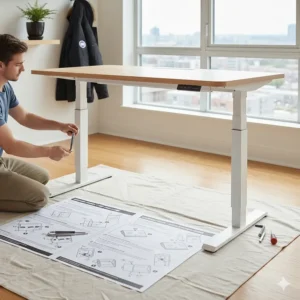
Assembly takes about 45-60 minutes if you’re working alone. The instructions are straightforward, though having a second person helps when attaching the desktop. One quirk: the three-button controller doesn’t have memory presets, so you’ll need to manually adjust each time. Some users mark their ideal heights on the desk frame with tape as a workaround.
✅ Pros: Excellent stability, quiet operation, widely available replacement parts
✅ Pros: Five-year warranty on frame and motor
✅ Pros: Free shipping within Canada on Amazon.ca
❌ Cons: No memory height presets
❌ Cons: Basic laminate finish won’t impress design enthusiasts
Canadian customer feedback highlights that shipping to remote areas (Yukon, NWT, Nunavut) can take 2-3 weeks longer than urban centres. Priced around $220-$250 CAD depending on desktop size, this remains the best budget standing desk Canada has to offer for most users.
2. VIVO DESK-E155TB – Maximum Value for Minimum Spend
Need a standing desk under $300 Canada on the tightest possible budget? The VIVO DESK-E155TB delivers impressive functionality for around $170-$200 CAD.
Key Specifications:
- Height range: 71-120 cm (28-47 inches)
- Desktop: 55″x24″ black top
- Load capacity: 70 kg (154 lbs)
The VIVO desk uses the same motor platform as many budget competitors, but excels in build quality for the price. The steel frame feels robust, and wobble is minimal even when fully extended. Canadian reviewers note that taller users (over 185 cm / 6’1″) may find the maximum height slightly limiting for comfortable standing.
What sets this affordable electric standing desk Canada apart is the memory controller—rare at this price point. Three programmable height presets mean you can switch between sitting, standing, and that perfect “leaning” position with a single button press. The LED display shows your current height in centimetres, making it easy to replicate ergonomic positions.
✅ Pros: Memory presets in budget category
✅ Pros: Solid steel construction
✅ Pros: LED height display
❌ Cons: Limited colour options (black only)
❌ Cons: Maximum height may not suit very tall users
The three-year warranty is decent, though shorter than FlexiSpot’s coverage. For value for money options, this desk punches well above its weight class. Just be aware that customer service response times can be slow during busy seasons.
3. FEZiBO 55×24 Electric Desk – Feature-Packed Budget Option
If you want the most affordable ergonomic solutions without sacrificing features, FEZiBO delivers. Typically priced between $150-$200 CAD, this desk is often the cheapest electric standing desk available on Amazon.ca.
Key Specifications:
- Adjustable range: 62-119 cm (24-47 inches)
- Sizes available: 40″, 48″, 55″, 63″ widths
- Capacity: 70 kg (155 lbs)
The FEZiBO stands out with its colour variety—rustic brown, maple, white, black, and even espresso finishes. The splice-board desktop (two pieces joined) keeps costs down but means a slight seam in the middle. It’s not a dealbreaker for most users, but perfectionists may prefer single-piece options.
Canadian buyers appreciate the anti-collision feature, which automatically stops the desk if it encounters resistance while adjusting. This is a safety feature usually reserved for pricier models. The desk also includes two hooks for hanging headphones or bags—small touches that enhance daily usability.
Assembly is straightforward, though some customers report that the included Allen key strips easily. Having your own tools on hand makes the process smoother.
✅ Pros: Widest colour selection in budget category
✅ Pros: Anti-collision safety feature
✅ Pros: Included accessory hooks
❌ Cons: Splice-board desktop has visible seam
❌ Cons: Customer service can be hit-or-miss
This best budget standing desk Canada option works brilliantly for students, casual users, and anyone prioritizing cost over premium finishes. The five-year warranty on frame components provides peace of mind despite the rock-bottom price.
4. IMGadgets 2026 6th Gen – Modern Features at Budget Price
The IMGadgets electric desk represents the newer wave of budget options hitting the Canadian market in 2026. Priced around $180-$220 CAD, it bridges the gap between ultra-cheap and mid-range.
Key Specifications:
- Height adjustment: 73-122 cm (29-48 inches)
- Desktop: 47″x24″ or 55″x28″
- Weight limit: 80 kg (176 lbs)
The IMGadgets 6th generation motor system is noticeably quieter than previous budget models, operating at under 50 decibels. That’s quieter than most office conversation, making it ideal for shared workspaces or Zoom calls. The dual USB charging ports (Type-A and Type-C) integrated into the control panel are genuinely useful for keeping phones and tablets powered without cluttering your desk.
Canadian customers highlight the improved cable management system compared to competitors. The included cable tray mounts under the desktop, keeping power cords and monitor cables organized. This might seem minor, but it makes a real difference when you’re constantly adjusting desk height.
The maximum weight capacity of 80 kg (176 lbs) edges out most competitors, accommodating heavier monitor arms and equipment without stability concerns.
✅ Pros: Quieter 6th generation motor
✅ Pros: Integrated USB charging ports
✅ Pros: Superior cable management
❌ Cons: Fewer user reviews (newer model)
❌ Cons: Limited desktop size options
For an affordable electric standing desk Canada with modern conveniences, this is a smart choice. The three-year warranty is standard, and Canadian shipping typically arrives within 5-7 business days to major cities.
5. Stand Up Desk Store Manual Crank – No Power, No Problem
Not everyone wants an electric desk. The Stand Up Desk Store manual crank model proves that cheap standing desk options don’t require motors or outlets. Priced around $280-$300 CAD, it’s the priciest on our list but offers unique advantages.
Key Specifications:
- Adjustment range: 85-120 cm (33-47 inches)
- Desktop: 60″x28.5″ with shelves
- Capacity: 70 kg (154 lbs)
The manual crank mechanism is surprisingly smooth once you get the hang of it. About 15 cranks take you from sitting to standing height—roughly 20-30 seconds of effort. This might sound tedious, but many users find the physical engagement actually helps them remember to adjust positions throughout the day.
What makes this desk special is the dual-level design. The lower tier holds your keyboard and mouse, while the upper shelf accommodates monitors at optimal eye level. This setup naturally promotes better posture without additional monitor stands.
The powder-coated metal frame is built to last. Several Canadian customers report using these desks for 5+ years without mechanical issues—a longevity you can’t always expect from budget electric motors.
✅ Pros: No electrical requirements
✅ Pros: Dual-tier ergonomic design
✅ Pros: Exceptional durability
❌ Cons: Manual adjustment requires effort
❌ Cons: Limited height range starts higher (not suitable for shorter users sitting)
This is the best cheap standing desk option for workshops, basements, or any space without convenient power access. The lifetime warranty against defects shows the manufacturer’s confidence in build quality.
6. ERGOMAKER Height Adjustable Frame – DIY Freedom
For Canadian woodworkers or anyone with a custom desktop already, the ERGOMAKER frame-only option delivers exceptional value at $220-$280 CAD.
Key Specifications:
- Height range: 71-121 cm (28-48 inches)
- Frame only (no desktop)
- Supports up to 80 kg (176 lbs)
The ERGOMAKER frame uses a dual-motor system, providing better stability than single-motor competitors. Each leg operates independently, ensuring level adjustment even if your floor isn’t perfectly flat. The memory controller stores three height presets, and the LED display is larger and more readable than most budget options.
This affordable ergonomic solutions approach works brilliantly if you already own a quality desktop or want to use reclaimed wood, bamboo, or custom materials. The frame accommodates desktop widths from 100-200 cm (40-79 inches), giving you significant flexibility.
Assembly requires attaching your chosen desktop, which takes about 30-45 minutes. The frame includes pre-drilled holes that fit most standard desktop thicknesses (1.9-5 cm).
Canadian buyers appreciate the ability to create a truly personalized workspace while staying within budget. Pairing this frame with a $50-$80 IKEA countertop creates a standing desk under $300 Canada that rivals desks costing $500+.
✅ Pros: Dual-motor stability
✅ Pros: Desktop customization freedom
✅ Pros: Wider width compatibility
❌ Cons: Requires separate desktop purchase
❌ Cons: Assembly slightly more complex
The five-year warranty covers all mechanical components. For budget desk quality comparison, this represents the best long-term value if you’re willing to source your own desktop.
7. MotionGrey Basic Series – Canadian-Made Quality
Proudly manufactured in Canada, the MotionGrey Basic series brings local quality to the budget standing desk market at $250-$290 CAD.
Key Specifications:
- Height range: 60-125 cm (24-49 inches)
- Desktop: Multiple sizes and finishes
- Weight capacity: 68 kg (150 lbs)
The MotionGrey desk starts lower and extends higher than most competitors, making it suitable for a wider range of user heights. The 60 cm minimum works perfectly for shorter individuals or children’s workspaces, while the 125 cm maximum accommodates taller Canadians comfortably.
Being Canadian-made means faster shipping, better customer service in your timezone, and supporting local manufacturing. The company offers showroom visits in Richmond, BC, if you want to test before buying. The responsive customer support team speaks both English and French, addressing bilingual needs.
The single-motor system is adequate for most home office setups, though it’s not as smooth as dual-motor alternatives. The MG-4 memory keypad stores four preset heights—one more than most budget options.
✅ Pros: Canadian manufacturing and support
✅ Pros: Widest height range (60-125 cm)
✅ Pros: Four memory presets
❌ Cons: Lower weight capacity than alternatives
❌ Cons: Single motor limits stability with heavy loads
The 30-day risk-free trial is exceptional in this price range. If you’re not satisfied, MotionGrey covers return shipping within Canada—a benefit rarely found with imported alternatives. For value for money options with the security of local support, this is hard to beat.
How to Choose the Right Cheap Standing Desk for Your Needs
1. Measure Your Space Accurately 📏
Before falling in love with a 60-inch desktop, measure your actual workspace. Don’t forget to account for wall clearance—you’ll need at least 5-8 cm behind the desk for cables and breathing room.
Consider your room layout. L-shaped desks work brilliantly in corners but waste space against straight walls. Rectangular desks maximize workspace in standard home office setups.
2. Calculate Your Weight Requirements
Add up everything going on your desk:
- Monitor(s): 5-10 kg each
- Laptop: 2-3 kg
- Books and supplies: 5-10 kg
- Monitor arm (if using): 3-5 kg
Most budget desks handle 70 kg (154 lbs) comfortably. If you’re approaching that limit, upgrade to models with 80+ kg capacity. Overloading causes motor strain and premature failure.
3. Prioritize Height Range for Your Body
The Government of Canada ergonomics guidelines emphasize that proper desk height prevents musculoskeletal disorders. Your standing desk should allow:
- Sitting: Elbows at 90-100 degrees when typing
- Standing: Screen top at or slightly below eye level
- Forearms: Parallel to floor when using keyboard
For reference:
- Users under 165 cm (5’5″): Look for minimum heights of 60-70 cm
- Users 165-185 cm (5’5″-6’1″): Standard 70-75 cm minimums work well
- Users over 185 cm (6’1″): Ensure maximum height reaches at least 120 cm
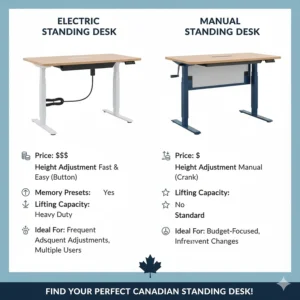
4. Decide: Electric or Manual?
Electric Desks:
- Effortless adjustment
- Memory presets available
- Higher initial cost
- Requires power outlet
Manual Crank Desks:
- No electrical requirements
- Lower maintenance
- Physical effort required
- Costs less initially
Most Canadians prefer electric for home offices where convenience matters. Manual makes sense for workshops, garages, or spaces without convenient outlets.
5. Read Canadian Customer Reviews Carefully
Don’t just check the star rating—read what fellow Canadians actually say. Look for comments about:
- Shipping times to your province
- Assembly difficulty
- Customer service responsiveness
- Long-term durability (reviews from 6+ months ago)
Pay special attention to reviews mentioning your specific use case (gaming setup, dual monitors, heavy equipment, etc.).

Benefits of Switching to a Standing Desk (Even a Cheap One)
Reduced Back and Neck Pain
Alternating between sitting and standing throughout your workday significantly reduces pressure on your lower back. The CCOHS notes that static forces—maintaining one position for extended periods—contribute heavily to workplace musculoskeletal disorders.
I personally noticed my chronic lower back pain diminishing within two weeks of incorporating standing intervals. The key is variety, not standing all day.
Increased Energy and Focus 🔋
Standing naturally increases blood circulation, delivering more oxygen to your brain. You’ll notice fewer afternoon energy crashes and improved mental clarity during long tasks.
Canadian research suggests that standing workers report feeling more engaged and productive compared to continuous sitting. It’s not magic—it’s just basic physiology working in your favour.
Better Posture Development
A cheap standing desk encourages natural posture correction. When standing, your body automatically stacks your spine more efficiently than slouching in a chair. Over time, this trains better postural habits even when you return to sitting.
Pair your new desk with periodic stretching and movement for maximum benefit.
Calorie Burning (Small but Real)
Standing burns approximately 0.15 more calories per minute than sitting. Over an eight-hour workday, standing for half that time adds up to roughly 40 extra calories burned.
It’s not a replacement for exercise, but every bit contributes to overall health. Think of it as a bonus, not the primary reason to stand.
Improved Mood and Reduced Stress
Movement matters for mental health. Breaking up sitting time with standing intervals helps regulate stress hormones and improves mood. Many users report feeling less mentally fatigued at the end of workdays.
Standing while taking video calls or during creative brainstorming sessions can boost energy and engagement noticeably.
Common Mistakes When Buying Budget Standing Desks
Ignoring Desktop Material Quality
The cheapest desks use particle board with thin laminate. These surfaces damage easily and sag under weight over time. Look for minimum 15mm thickness with solid wood or quality engineered wood.
Splice boards (two pieces joined) save money but create a visible seam. Single-piece desktops look cleaner and feel sturdier.
Overlooking Motor Quality
Single motors work fine for desks under 50 lbs total weight. If you’re adding multiple monitors, monitor arms, or heavy equipment, invest in dual-motor systems. The stability difference becomes obvious when fully extended.
Skipping Warranty Research
Some brands advertise “lifetime” warranties but exclude motors, electronics, and surfaces—basically everything that can fail. Read the fine print. Legitimate five-year warranties on mechanical components indicate manufacturer confidence.
Forgetting About Assembly Complexity
“Easy assembly” means different things to different people. Check review photos to see actual assembly steps. Some desks require two people despite claiming otherwise. Budget an extra 30 minutes beyond the estimated time.
Neglecting Ergonomic Accessories
A standing desk alone doesn’t guarantee comfort. You’ll likely need:
- Anti-fatigue mat ($30-$60 CAD)
- Monitor arm or riser ($40-$100 CAD)
- Cable management solutions ($15-$30 CAD)
Factor these into your total budget. A $200 desk plus $100 in accessories still beats a $500 desk without the ergonomic foundation.
Standing Desk Setup Tips for Maximum Comfort
Monitor Height is Critical
Your screen’s top should sit at or slightly below eye level. This prevents neck strain from looking down or up continuously. Most people need their monitor 50-70 cm from their face.
If your desk’s standing height pushes your monitor too low, invest in a monitor arm or stacking solution. Your neck will thank you.
Keyboard Position Matters More Than You Think
Your keyboard should sit low enough that your forearms remain parallel to the floor when typing. Wrists bent upward or downward create strain that compounds over hours.
Some desks include keyboard trays for this reason. If yours doesn’t, you might need to add one separately.
Anti-Fatigue Mat Investment
Standing on hard floors causes foot, knee, and back fatigue faster than you’d expect. A quality anti-fatigue mat distributes pressure and encourages subtle movement.
Budget $40-$60 CAD for a decent mat. Cheaper foam mats compress quickly and lose effectiveness.
Start Gradually with Standing Time
Don’t try standing all day immediately. Start with 15-20 minute intervals, sitting when you feel fatigue. Gradually increase standing duration as your body adapts.
Many users find a 50/50 sitting-standing split works best long-term. Listen to your body rather than forcing rigid schedules.
Organize Cables Before First Use
Trust me on this—organize cables before you start working. Once your desk is operational, you’ll never want to disassemble everything to fix messy wiring.
Use the included cable management trays, velcro straps, and clips. Future you will appreciate the effort when adjusting desk height doesn’t require untangling cable spaghetti.
Budget Standing Desk vs. Premium Models: Worth the Upgrade?
What You Lose with Budget Options
Premium desks ($600-$1,200 CAD) typically offer:
- Quieter motors (30-35 dB vs. 45-50 dB)
- Faster adjustment speeds (3.8 cm/s vs. 2.5 cm/s)
- Higher weight capacities (130+ kg vs. 70 kg)
- Better warranties (10-15 years vs. 3-5 years)
- Premium materials (solid wood, bamboo vs. laminate)
If you’re running a professional studio, these differences justify the cost. For home office use, they’re nice-to-haves rather than necessities.
Where Budget Desks Deliver Equal Value
Functionally, a $200 desk adjusts between sitting and standing just like a $800 model. The core benefit—positional variety—remains identical.
Modern budget motors are reliable enough for daily use. With proper care, you can expect 3-5 years of solid performance, after which replacement might make sense anyway as technology improves.
The Smart Middle Ground
Many Canadians find the best value by buying a budget frame ($200-$250 CAD) and upgrading the desktop separately ($80-$150 CAD). This approach gets you 80% of premium desk benefits at 40% of the cost.
Pair a reliable electric frame with a quality desktop, add a decent monitor arm, and you’ve created a workspace that rivals desks costing twice as much.
Maintaining Your Budget Standing Desk for Maximum Lifespan
Monthly Quick Checks
Inspect leg joints and bolts for looseness. Vibration during adjustment can gradually loosen connections. Tighten with the included hex key every 4-6 weeks.
Wipe down the desktop and frame to prevent dust buildup in motor mechanisms. A damp cloth works perfectly—avoid harsh chemicals that damage laminate finishes.
Quarterly Deep Maintenance
Check the motor housing for dust accumulation. Compressed air clears debris that can cause overheating or noise.
Test all height presets to ensure they’re still accurate. Motors can drift slightly over time. Reprogram if needed.
Verify cable management solutions remain secure. Cables that dangle or snag cause adjustment issues and safety hazards.
What to Avoid
Never exceed the stated weight capacity. Overloading strains motors and causes premature failure not covered by warranties.
Don’t force adjustments if the desk stops moving. This usually indicates an obstacle or mechanical issue. Forcing damages motors permanently.
Avoid placing the desk near heating vents or in direct sunlight. Temperature extremes affect laminate adhesives and electronic components.
When to Call Customer Service
Contact support immediately if you notice:
- Unusual grinding or squealing noises
- Uneven lifting (one side higher than the other)
- Controller errors or failure to respond
- Visible bowing or sagging of the desktop
Most issues covered by warranty get resolved with replacement parts or full desk replacement. Don’t attempt DIY repairs that void coverage.
Comparison Table: Budget vs. Premium Standing Desks
| Feature | Budget ($200-$300) | Premium ($600-$1,200) |
|---|---|---|
| Motor Type | Single motor | Dual motor |
| Noise Level | 45-50 dB | 30-35 dB |
| Adjustment Speed | 2.5 cm/s | 3.8 cm/s |
| Weight Capacity | 70-80 kg | 120-160 kg |
| Desktop Material | Laminate/Splice | Solid wood/Bamboo |
| Warranty | 3-5 years | 10-15 years |
| Memory Presets | 2-4 positions | 4+ positions |
| Stability | Good | Excellent |
| Customer Service | Variable | Premium support |
Top Budget Desk Quality Comparison: Price vs. Value
| Model | Price Range | Value Score | Best Use Case |
|---|---|---|---|
| FlexiSpot EC1 | $200-$250 | 9/10 | General home office |
| VIVO DESK-E155TB | $170-$200 | 9.5/10 | Maximum budget stretch |
| FEZiBO 55×24 | $150-$200 | 8.5/10 | Students & renters |
| IMGadgets 2026 | $180-$220 | 8/10 | Tech-focused users |
| Stand Up Desk Store | $280-$300 | 7.5/10 | Manual adjustment fans |
| ERGOMAKER Frame | $220-$280 | 9/10 | DIY customizers |
| MotionGrey Basic | $250-$290 | 8.5/10 | Canadian warranty priority |
✨ Don’t Miss These Exclusive Deals!
🔍 Take your workspace to the next level with these carefully selected products available in Canada. Click on any highlighted item to check current pricing and availability on Amazon.ca. These tools will help you create an authentic ergonomic setup your body will love!
Frequently Asked Questions
❓ What is the best cheap standing desk in Canada for 2026?
❓ Are electric standing desks under $300 CAD reliable for daily use?
❓ How much should I budget for a complete standing desk setup in Canada?
❓ Can short people use budget standing desks comfortably?
❓ What's the difference between single-motor and dual-motor standing desks?
Conclusion: Your Path to a Healthier Workspace Starts Here
Investing in a cheap standing desk doesn’t mean compromising your health or comfort. The Canadian market in 2026 offers more quality budget options than ever before, with real improvements in motor technology, materials, and features.
Whether you choose the reliable FlexiSpot EC1 for its proven track record, the budget-friendly VIVO for maximum savings, or the DIY-friendly ERGOMAKER frame for customization, you’re making a positive change for your body and productivity. Remember that the best standing desk is one you’ll actually use consistently.
Start with reasonable expectations. Your new desk won’t magically eliminate years of poor posture habits overnight, but it provides the foundation for healthier working patterns. Combine it with regular movement, proper ergonomic setup, and gradual adaptation to standing intervals.
The difference between sitting eight hours straight and alternating positions throughout your day compounds over weeks and months. Less back pain, more energy, improved focus—these aren’t marketing promises, they’re real benefits Canadian users experience daily.
Your workspace should support your wellbeing, not undermine it. For under $300 CAD, you can make that happen. The hardest part is starting. The investment pays dividends in comfort, health, and productivity every single day thereafter.
Recommended for You
- 7 Best Dual Motor Standing Desks Canada 2026
- 7 Best Electric Standing Desks in Canada 2026 (Expert Review)
- 7 Best Standing Desks Canada 2026: Transform Your Health
Disclaimer: This article contains affiliate links to Amazon.ca. If you purchase products through these links, we may earn a small commission at no additional cost to you.
✨ Found this helpful? Share it with your friends! 💬🤗
